Essential four / Digital self-defence
Protect
your
attention.
Check twice.
Share less. Stay human.

For young people of the screen-born generation.
Adapted from Brendan O’Keefe’s onetoeight guide.
V.1.0.0
It sounds
like someone you know.
An imagined scene. The details may vary.
“Hi, I’ve lost my phone. I’m using someone else’s number. Can you transfer some money? Please don’t call, I’ll explain later.”
The message uses a familiar name. The request is urgent. Your stomach drops before your brain has caught up.
You might click a parcel link, reply to a “bank”, open a file from a classmate or answer a video call from someone who looks and sounds right.
The safest first move is not to decide faster. It is to create a pause.
Digital self-defence is the set of habits that helps you protect your privacy, accounts, money, identity, attention and relationships online.
It is not about believing every screen is evil. You use digital tools to learn, work, make art, find people and organise your life. It is about understanding that convenience always has a design behind it, and that a message can be engineered to make you rush.
Your data may be collected, your feed may be shaped and criminals may try to trick you. Those facts do not mean you are helpless or permanently watched by a mysterious control room. They mean a few practical habits are worth learning.
Defence also includes knowing when to ask for help. If you have clicked something, sent money or shared information, tell someone quickly. Shame helps scammers. Speedy support helps you.
The short version
This chapter is about protecting your accounts, your privacy and your attention without treating every screen as the enemy.
- The safest first move isn’t deciding faster. It is creating a pause.
- A message can be engineered to make you rush. Check unexpected requests through a separate channel.
- Seeing is not the same as knowing. A face or a voice on a screen is no longer proof of who is behind it.
- Privacy isn’t hiding. It is room to think, change and have relationships without everything becoming a performance.
What you’ll do: one safeguard a day for a week, and one personal rule you write down.
Privacy is room
to become yourself.
Apps and websites can record information about what you do, where you go, what you click, what device you use and which content keeps your attention. The exact data varies by service and settings. Read the privacy information when a decision matters, rather than trusting a slogan.
Data can be used to personalise a service, measure performance, show adverts, prevent fraud or build profiles. Some companies share data with partners. Some let you control parts of this. Some explanations are long enough to make a person consider taking up knitting.
Voluntary and background footprints
Your public posts are one part of your footprint. Account activity, location history, device identifiers and app permissions can create another part in the background. You cannot remove every trace of using a modern phone, but you can reduce what you share and check what is public.
A privacy check that takes twenty minutes
Search your name.
Look at what a stranger could learn. Do not publish your address, school timetable or live location while checking.
Review public posts.
Remove or archive anything you no longer want public. Remember that deleting something may not remove copies already saved by others.
Check permissions.
Review location, camera, microphone, contacts and photo access. Keep what an app needs to work. Question the rest.
Privacy is not secrecy
Wanting control over who sees your information does not mean you are hiding wrongdoing. Privacy gives people space to think, change and have relationships without every action becoming a permanent public performance.
Settings change. Check important accounts occasionally, and use official support pages for current instructions. A chapter cannot know which buttons your phone manufacturer moved last Tuesday.
Make the second
check automatic.
A scam often works by combining a believable story with pressure. Your defence is a pause and a second route to the truth.
Common pressure signals
Be cautious when a message demands secrecy, unusual payment, a password, an authentication code, gift cards, cryptocurrency, urgent action or a click to “fix” a problem. Familiar logos and names can be copied. Caller ID can be faked. A real-looking message is not proof.
The verification loop
Stop.
Do not click, reply, transfer money or share a code while the message is creating panic.
Separate channels.
Contact the person or organisation using a number, app or website you already trust. Do not use the details in the suspicious message.
Ask someone.
A second pair of eyes is useful, especially when the message says you must keep it secret.
Passwords and account recovery
Use a password manager if it works for you, and give important accounts unique passwords. Turn on multi-factor authentication, preferably with an authenticator app or security key where available. Save recovery codes somewhere safe. Never give anyone a one-time code because they say they need to “verify” you.
Security habits should fit your access needs and devices. A password manager you cannot use is not a successful defence. Ask a trusted person or official support service for help setting one up.
If something has happened
Contact your bank or service provider immediately, change affected passwords from a clean device if possible, preserve evidence and report the incident through the appropriate official channel. Tell someone. Fast action is useful; self-blame is not.
Seeing is not
the same as knowing.
Images, audio and video can be edited or generated. A voice note can be copied. A familiar face can appear to say something that person never said. This does not mean every strange clip is fake. It means appearance alone is weaker evidence than it used to be.
When a request matters
If someone asks for money, a password, a private image or an urgent decision, verify them through a separate channel. Call a number you already have. Ask a question only the real person is likely to answer, but do not rely on a “secret word” as your only protection.
Look for context rather than trying to become a human deepfake detector. Is the request unlike the person? Is there unusual urgency? Does another reliable source confirm the event? Could the account itself be compromised?
Protect your own material
Think before posting clear recordings of your face, voice, home, school, workplace, location or other people. You do not need to disappear from the internet. You can choose what belongs in public, what belongs to friends and what belongs nowhere online.
Never share intimate images without clear consent. If someone threatens to share an image of you, do not pay or send more material. Save evidence, block where appropriate and seek immediate support from a trusted adult or an appropriate service. You are not responsible for someone else’s abuse.
The gut feeling is a prompt
If something feels wrong, you do not need to prove it before slowing down. Check through another route. A sensible pause is not paranoia. It is a safety habit.
AI tools can be useful, but do not paste private medical, financial, school, work or identifying information into a service unless you understand how it handles that data. “Free” does not tell you enough. Read the current policy and use privacy controls where available.
Your feed is not
a neutral window.
Platforms choose what to show you using signals such as your activity, the people you follow and what keeps similar users engaged. This can help you find useful things. It can also make a feed repetitive, intense or upsetting because strong reactions are easy to measure.
Your feed is not a full picture of the world, and it is not a reliable measurement of your value. A platform can learn that you pause on anxious content without understanding why you paused.
Change the conditions
Mute accounts that make you feel worse. Turn off unnecessary notifications. Use screen-time tools as information rather than a new reason to punish yourself. Put the app somewhere less automatic. Take breaks when you choose, while keeping the communication and accessibility functions you need.
If a feed is affecting sleep, eating, school, work or mood, tell someone. The answer may be a setting, a conversation, professional support or a mixture. Do not let an app become your only source of advice about your mental health.
Notice the trigger. What were you feeling before you opened the app?
Curate one thing. Unfollow, mute or reset a recommendation that keeps pulling you into a worse mood.
Replace the gap. Decide what you will do for five minutes when you are not scrolling.
Digital self-defence includes protecting your attention from systems designed to keep it. It also includes choosing online connection when it genuinely helps. The point is control, not purity.
Do the boring
things first.
Security is rarely cinematic. It is updates, backups, unique passwords and checking the address before you enter details. Boring is underrated. Boring is often still working.
Update devices and apps.
Updates often fix security problems. Turn on automatic updates when suitable for your device and data plan.
Use multi-factor authentication.
Protect email, banking, social accounts and your phone provider first. Email is especially important because it can reset other accounts.
Back up important files.
Keep a backup in a separate place. Test that you can recover something. A backup you have never checked is a hopeful rumour.
Check links and domains.
Open important services through a saved bookmark or typed official address. Treat shortened links and unexpected attachments carefully.
Review account access.
Remove old devices, apps and accounts you no longer use. Check forwarding rules and recovery details on important accounts.
Public Wi-Fi and VPNs
Public networks are not automatically dangerous, and a VPN is not an invisibility cloak. Use HTTPS, keep devices updated, avoid sensitive actions on unfamiliar networks and understand what a VPN provider can see.
For current UK guidance, start with the National Cyber Security Centre. For account-specific incidents, use the service’s official support and your bank’s fraud team. Search results can be useful, but official routes are safer for urgent recovery.
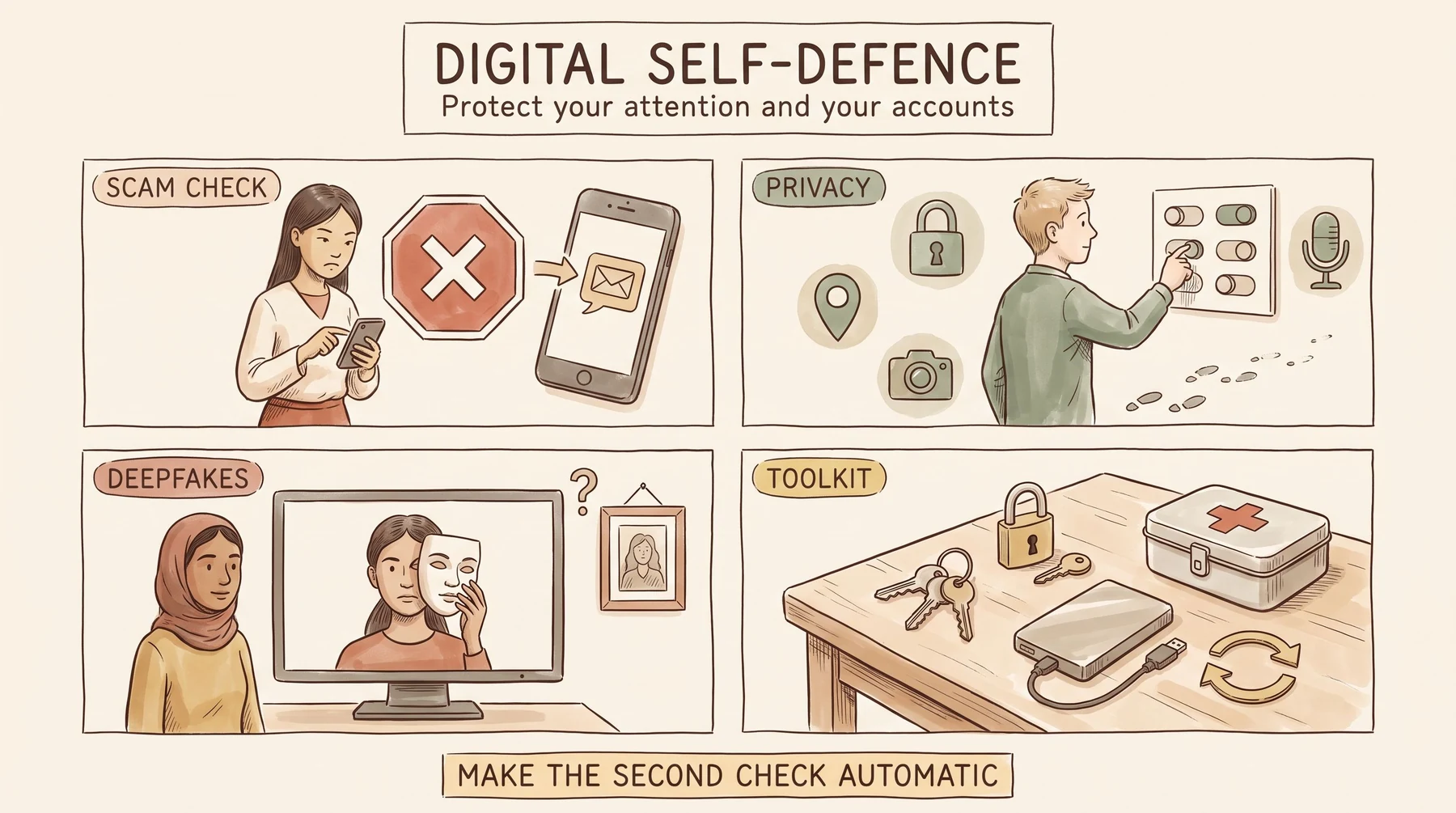
Text version of this graphic
Digital self-defence
Protect your attention and your accounts.
Scam check. An urgent message arrives. Stop, check it through a second channel, and ask someone you trust before you act.
Privacy. Review what your accounts and apps can see, and turn off the permissions you do not need.
Deepfakes. Seeing is not the same as knowing. A face on a screen is not proof of who is behind it.
Toolkit. The boring things first: account recovery, multi-factor authentication, updates and backups.
Make the second check automatic.
One safeguard
each day.
Choose what fits your devices, age, access and responsibilities. You do not need to complete every task to be safer than you were yesterday.
Check one privacy setting. Review an app’s location, camera, microphone or contact access.
Secure your email. Use a unique password and multi-factor authentication if available.
Verify a message. Practise checking an unexpected request through a separate channel.
Update and back up. Install pending updates and copy one important file somewhere safe.
Curate your feed. Mute one account or topic that repeatedly harms your attention or mood.
Tell someone the plan. Share one scam signal or security habit with a friend or family member.
Write your rule. “I do not transfer money from an urgent message without calling back” is a good start.
If you make a mistake, act early. Scam victims are not foolish, and privacy mistakes do not make you permanently ruined. Get help, repair what you can and learn the pattern.
Defence is communal
Tell people when a scam is circulating. Help without mocking. A person who is embarrassed may hide the incident, which gives the scam more time.
A few questions.
One safer habit.
Choose a question to think about, write about or discuss. In a group, passing is always an option. Do not share passwords, private messages or identifying details.
- What kind of digital request makes you rush: money, messages, account warnings or something else?
- Which account would cause the most trouble if you lost access? How could you protect it first?
- What information about you is public that you would rather keep limited?
- Which setting, update, backup or conversation would make your digital life safer this week?
- How could you help someone report a scam without making them feel stupid?
My verification rule: …
My first safeguard: …
Someone I can ask for help: …
Before you move on
Use these as reflection prompts, not entry requirements for the next essential. On this page, ticks are temporary and are not saved.
Essential four, in short
Digital self-defence is practical literacy. Share less where you can, protect important accounts, verify urgent requests, care for your attention and ask for help quickly when something goes wrong.
You can stop reading now. Put your phone down for a moment and notice the nearest real object. Then pick it up, leave it there or use it to contact someone you trust. The choice is yours.
End of Essential Four